 |
clearString neatComponents
|
|
clearString neatComponents Link Options |

| ||
| Application Development | |
Link Options | ||
| |
The Link Management Options-tab allows you to control where the linked resource opens in your app.
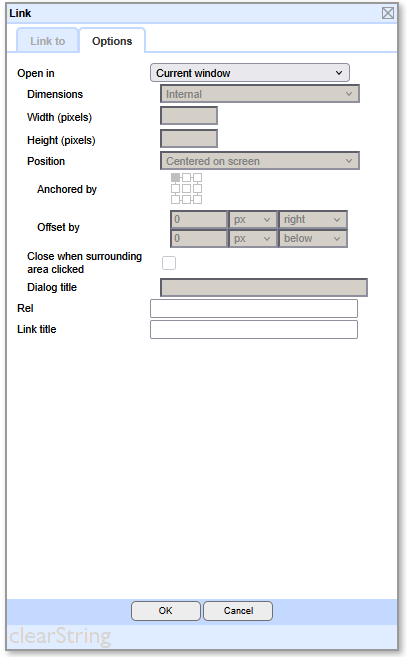
New Tab Location
Open in New Tab will open the link in a new tab of the same browser window providing the browser supports tabs.
Window Locations
.png)
Note that New Window supports Sizing controls (see below).
| Term | Without Frames (simple tab) | With Frames (iframes/frameset) |
|---|---|---|
| Current Window | The active tab or window you are in. | The specific frame (iframe) currently executing the script. |
| New Window | A completely separate browser tab or window created by target="_blank" or window.open(). | Same: a new top-level tab/window. But it can be opened from a frame. |
| Top Window | Same as current window (no difference). | The highest-level browser tab/window that contains all frames. |
| Parent Window | Same as current window (no parent). | The immediate container of the current frame (could be another frame or the top window). |
Sizing Control
.png)
The Sizing Control allows you to specify the width and height of the opening resource.
You can specify whether the measurements (in pixels) are internal or external of any borders..
Sizing Canvas and Dialog
.png)
In addition to Internal and External sizing you can alternatively allow the destination page control the dimensions.
The control is in the Behavior Editor of the Destination page, Settings | General Options | Display in Dialog
This also applies to using a Canvas.
.png)
Dialog or Canvas
The Dialog and Canvas controls enable you to load the link destination component content into a Dialog (conventional dialog box with borders) or a Canvas (a borderless dialog).
The destination displayed in the Canvas or Dialog may be any component. It is most commonly a Page, but it could be a Data Entry Form or any other component you wish.
The Dialog or Canvas will open 'above' the currently visible surface.
You can set the Dialog or Canvas to close when you click elsewhere in the window.
A Dialog title can be defined, if that is desired.
.png)
Position Control
The Dialog or Canvas will open by default in the center of the screen.
.png)
You can alternatively have the Dialog or Canvas open relative to the cursor position, Anchored by the grid selector.
This option gives you the effect of a fully controllable 'tool tip'.
Additional Settings
.png)
Querystring enables you to append a querystring to the link to cause an action in the destination.
Anchor enables you to set an HTML Anchor within a destination to control where the link lands.
Rel sets the relationship between the current document and the linked document/resource (if required. See more...)
Link title enables you to set the title that appears in the default mouse-over action in the browser.
Copyright © 2026 Enstar Systems Inc. All rights reserved |