 |
clearString neatComponents
|
|
clearString neatComponents How to delete a page |

| ||
| Application Development | |
How to delete a page | ||
| |
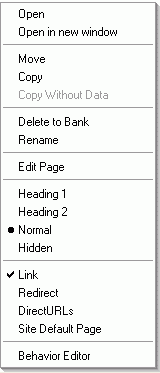 In the Layout Manager, right-click on the page in the website tree.
Choose 'Delete to bank'
Click OK when asked to confirm.
Note: You cannot undo this action. The contents of the page will be permanently lost.
Copyright © 2026 Enstar Systems Inc. All rights reserved |