 |
clearString neatComponents
|
|
clearString neatComponents Working with NAT |

| ||
| Installing | |
Working with NAT | ||
| |
Working with NAT
Working with a Cloud Server
Looking for firewall information for your cloud server?
You will find information about firewalls on a cloud server here...
Setting Port Forwarding or NAT
Working with 'local' physical routers and firewall devices.
On the Router/Firewall
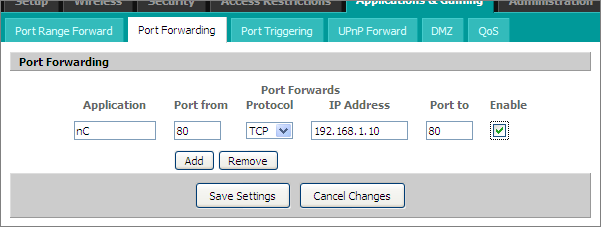
All routers and firewalls are slightly different, but above is a typical router control panel.
It is set to forward traffic arriving at the router/firewall on Port 80 to the Port 80 on the neatComponents machine, which has a local IP address of 192.168.1.10
Your router/firewall may look different. This website provides advice on many different Router brands.
Settings in neatComponents
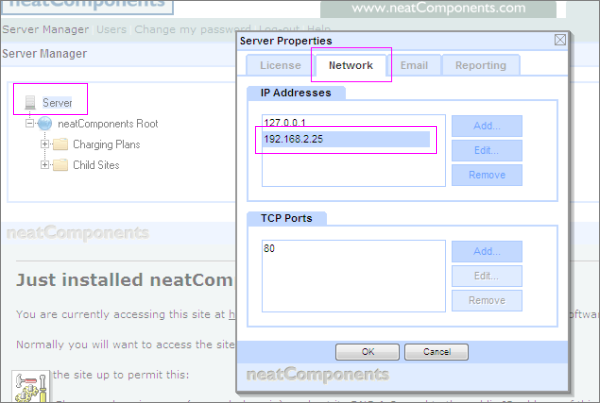
If neatComponents is installed onto a machine with a direct Internet connection having an IP address of, for example 217.174.250.18 then in the neatComponents 'Server Manager', Server-node, Network-tab (above) that is the IP address you would enter (in addition to the 127.0.0.1, localhost address).
If your neatComponents machine is on a LAN (Local Area Network) behind a Router - which is the normal SOHO situation - then your router is the device that has the 217.174.250.18 IP address - so you must enter the local LAN IP address of the neatComponents machine. In the example above - 192.168.2.5
Working with a Dynamic IP Address
You really do need to have a fixed (static) IP address for all production uses, but for testing, trialling and light-weight usage you can often manage with a dynamic IP address, as we explain here.
Most Internet connections are provided with a fixed IP address by your ISP, but if your connection has a dynamic IP address - one which changes from time to time - then you need to use a service that will automaticaly follow your IP address as it changes.
We explain how here...
Setting up access In this section |
|
Setting up access In this section: |
|
Copyright © 2026 Enstar Systems Inc. All rights reserved |