 |
clearString neatComponents
|
|
clearString neatComponents Events |

| ||
| Application Development | |
Events | ||
| |
Events cause things to happen by triggering Actions, and Actions are the workhorse of apps because they make things happen.
Events, Actions and Conditions are used together to create systems. Read more below...
Events are defined in the Table Component, Configure Table screen, under the Events tab.
Creating an Event
Events are normally triggered by user activity (e.g. clicking a submit button).
.png)
Some Events may also be triggered by by Intersite Communication.
Events run within the scope of individual Records.
- Actions have access to the Field values of that individual Record.
- To affect multiple Records the Event is run once for each required Record.
Conditions can also be applied to control when an Action is triggered.
.png)
Many Events happen instantly on trigger, but it is sometimes the case that you want to queue the Event as a Background Task.
.png)
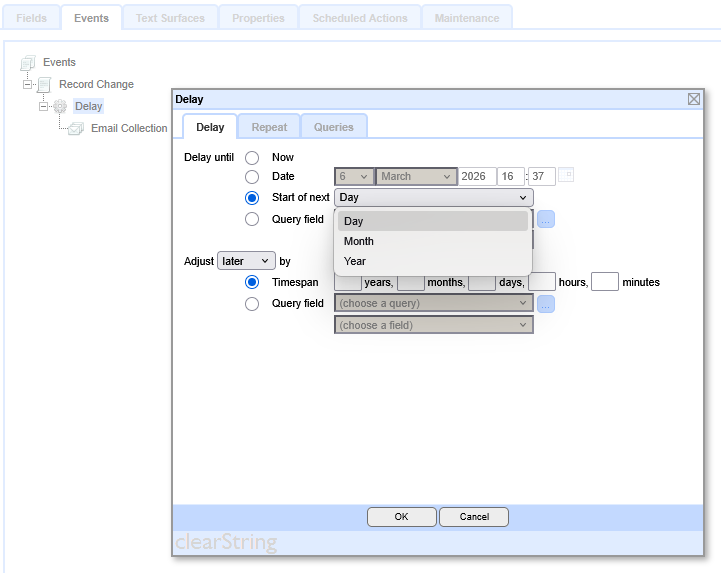
You can also delay the Event, or run it on a schedule or base the action on a Query
Record Update Event
This is the base Record Change Event and is provided automatically.
The Table’s Record Update Event is triggered whenever the record is updated, regardless of whether the update was made directly at the Table component itself, or on any of its linked Data Entry Forms. The Record Update Event configured on a Data Entry Form will only be triggered by an update made on that particular Data Entry Form.
When a form is submitted, the Record Update Event is queued to be triggered as soon as possible. This normally happens almost immediately, but ultimately is dependent on server loading and other scheduled activity.
To provide the user with the fastest experience they are taken to their post-submission page immediately, rather than waiting for the event to be executed (in particular some actions that interface with external services may take some time). This asynchronous processing of the event means that if the user is taken directly to a page which is displaying data that is dependent on actions taken by the event, they are unlikely to see the new data. This can be mitigated by taking them via a holding page, or querying the record until a status flag field indicates processing is complete.
Intersite Communication
Intersite Communication Events enable the communication of data between sites.
Communication between sites is key to:
- Creating Scalable solutions
- Allowing strategic reuse of modules of functionality
Learn more about Intersite Communication
Custom Events
In addition to the system-provided Record Update Event, you can add any number of Custom Record Events to a Table.
- Right click on Events, choose New > Event > Custom Record Event, then name the event. Click Apply to save the event.
Custom Events can be thought of as Functions. You can call them from within other events, and pass values to them. Event executing can cascade, or even be set to recurse back on itself.
An empty Event does nothing itself. Within an Event you can define any number of Conditions, Actions, and Delays.
- Conditions allow you to determine the circumstances when any following actions should be executed.
Learn more about Conditions.
- Actions are the payload, making things happening, for example changing field values, adding or deleting records, triggering the execution of other Events etc.
Learn more about Actions.
- Delays allow you to define when Actions should happen. Often you don’t want a delay, and need immediate execution, but sometime you want the system to wait, maybe days, before sending a reminder email. Delays can also be set to repeat, looping over a set of Actions on a regular basis.
Learn more about Delays.
Note
There is a similar Events tab available to Data Entry Forms. However, Data Entry Forms are always linked to a particular Table, so it is usually best practice to configure the Table’s Events, rather than the Data Entry Form, primarily so you can keep all the business logic together.
The Events tab is also provided on the Login component and the Shopping Cart component.
Events In this section |
Events In this section: |
Copyright © 2026 Enstar Systems Inc. All rights reserved |