 |
clearString neatComponents
|
|
clearString neatComponents Introduction to Process Management |

| ||
| Application Development | |
Introduction to Process Management | ||
| |
Business Process Management (BPM) is concerned with managing the flow of information through an organization. This information may be complete in of itself, or it may represent the flow of real-world objects through a process, for example manufacturing or logistics.
BPM is a wide-ranging term, and there is no standard implementation that will suit all circumstances. To allow for this the system provides a toolkit of functionality, and leaves it to the system designer to choose how to assemble them together. Once assembled, these form a ‘state machine’ through which data can be modelled and flow.
There is no limit to the complexity of the flow, states or logic involved.
External Integration
This section of the documentation is primarily concerned with creating managing process flows within the neatComponents.
Key components
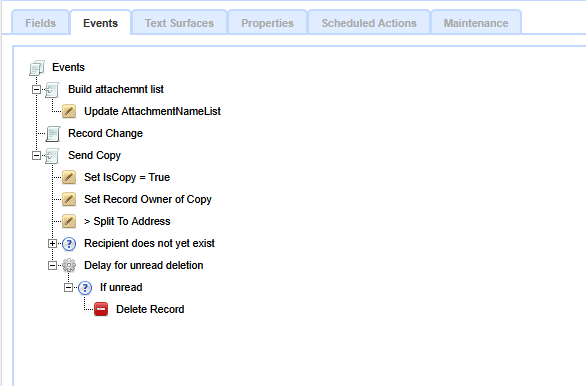
A typical Event tree showing Events, Conditions and Actions
The central component for any such system will be the Table component. This will be configured with fields to contain the data flowing through the system, together with fields used to indicate the state for the record. These control fields can be of any of the standard datatypes, but text, numeric and recordlink fields are the most common.
A simple system might consist of just the one Table component, but more complex ones may contain several.
The Data Entry Form component is key in guiding users through the process. Users are presented with a fully customizable Data Entry Form linked to a Table, and use this to change the state of the record. Once the form has been submitted, this triggers a Record Change Event. The Event acts as an execution entry point for one or more Actions to be executed. The Events and Actions form the core of the flow, and are, conceptually, the state machine.
Tables and Data Entry Forms are documented elsewhere, along with the rest of the supporting components. In this section we concentrate on the Events and Actions themselves, along with the Conditions and Delays that determine if and when they are executed.
Events
Events cause things to happen by triggering actions. Events are normally caused by user action (e.g. clicking a submit button) as well as a conditions being satisfied and by Intersite Communication
Conditions
Conditions allow you to determine the circumstances when any following child actions should be executed.
Actions
Actions make changes and are triggered by Events in Tables, for example changing field values, adding or deleting records, or triggering the execution of other Events and so on in cascade.
Copyright © 2026 Enstar Systems Inc. All rights reserved |